What the inbox is
One queue for every guest message, wherever it was sent from — how the screen is laid out and who sees what.
Guests write to you in whatever they already have open. Some message you on a messenger, some use the chat button on your storefront, and each of those has its own app, its own login and its own way of losing a message.
Smart Inbox removes that problem: every connected channel lands in one queue, in one screen, with one set of rules about who answers what. Your team stops asking "who has the phone with the messenger on it" and starts asking "what's still unanswered".
The channels themselves are connected once, in Settings → Integrations. After that this page never asks you to think about them again — a conversation is a conversation, and the small icon beside a guest's name is the only reminder of where it came from.
Where it lives
Smart Inbox is in the sidebar under Guest Suite, with a badge counting what is still unread — so you can see from any other screen that guests are waiting.
If the page says No access — "You don't have permission to view the Smart Inbox." — none of your roles includes Sees guest conversations in any property. Roles are given on the Team tab; replying needs Replies to guests, and handing a conversation to a colleague needs Assigns conversations to colleagues.
How the screen is laid out
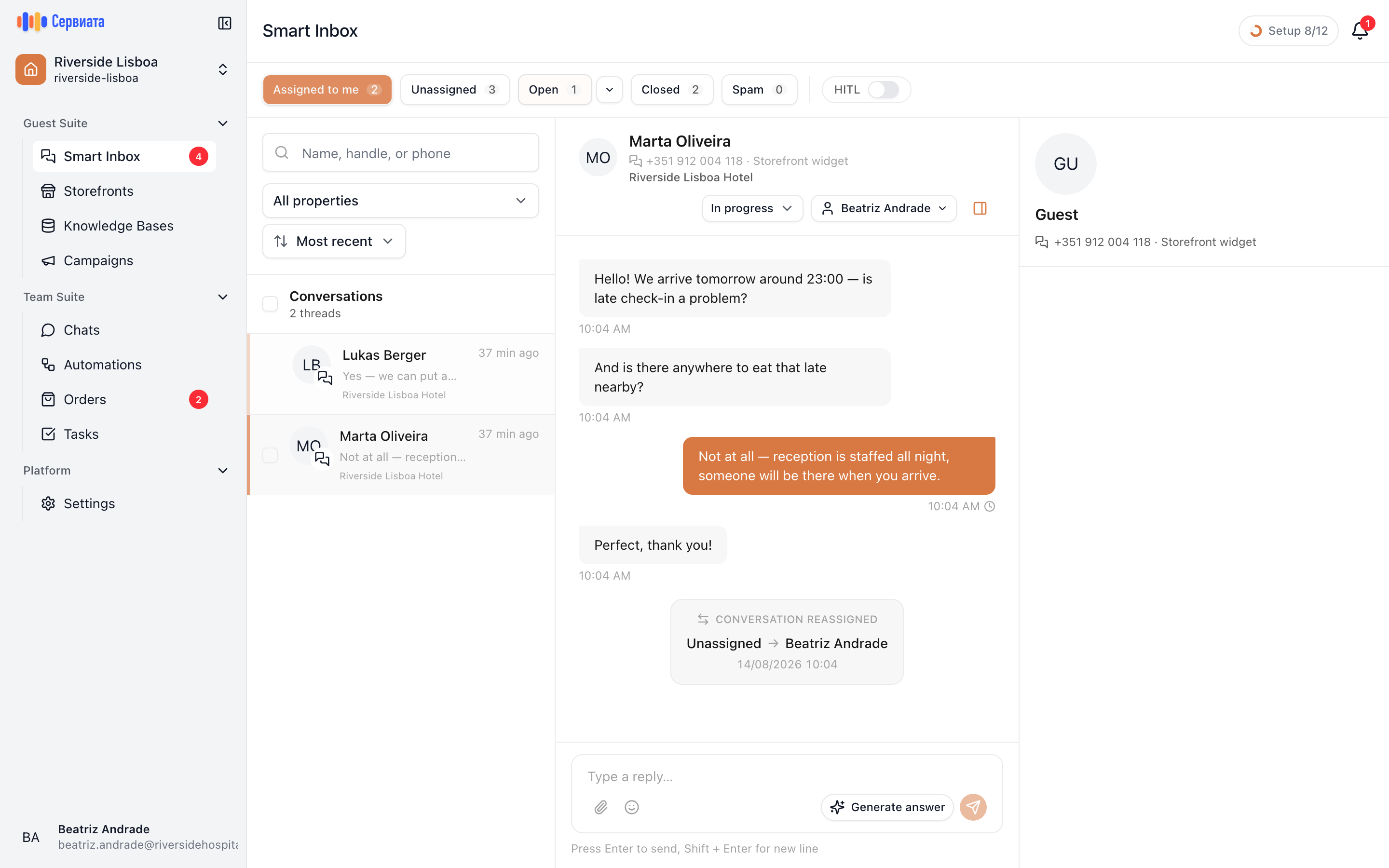
- 1
- 2
- 3
- Buckets: where a conversation sits and how many are in each
- The queue itself — one row per conversation
- The conversation you have open, and where you reply
Four parts, left to right and top to bottom:
| Part | What it's for |
|---|---|
| Buckets across the top | Assigned to me, Unassigned, Open, Closed, Spam — each with a count. |
| The list | Every conversation in the chosen bucket, newest activity first. |
| The thread | The messages, and the box you reply from. |
| The guest panel | The contact behind the conversation and the channel it came through. |
On a narrow screen the three panes become one at a time: the list, then the conversation, with a back arrow between them.
What a conversation is
One conversation is one guest on one channel. Everything they have ever sent you there is in it, in order, however long ago it started — so the person answering today can read what was promised last week.
Each one carries a few things your team works with:
- A status — where the conversation has got to: New, In progress, Waiting, Closed, Spam.
- An assignee — the person who owns it, or nobody.
- An alert, when the assistant thinks a human is needed right now.
- A property — which hotel it belongs to, or the workspace as a whole.
Who sees which conversations
Inbox access comes with a role, per property, the same way as everything else in the workspace. You see the conversations of the properties where your roles include Sees guest conversations; a workspace-level conversation — one that isn't tied to a single building — is visible to people who hold that permission in a workspace role.
That is also what the property filter above the list is for: with access to several hotels, you can narrow the queue to one of them, or open all of them at once.
What's next
- Answering your first guest — find it, take it, reply, close it.
- Finding the right conversation — buckets, search, filters.
- What the assistant does — how it marks conversations up and when it steps aside.