Map your property
The first-time builder — name a building, generate its floors and rooms, add the grounds, create everything in one go.
A property with no locations yet opens on a builder instead of an empty screen. It exists for the one job nobody wants to do by hand: turning "six floors of twenty rooms" into a hundred and twenty rooms.
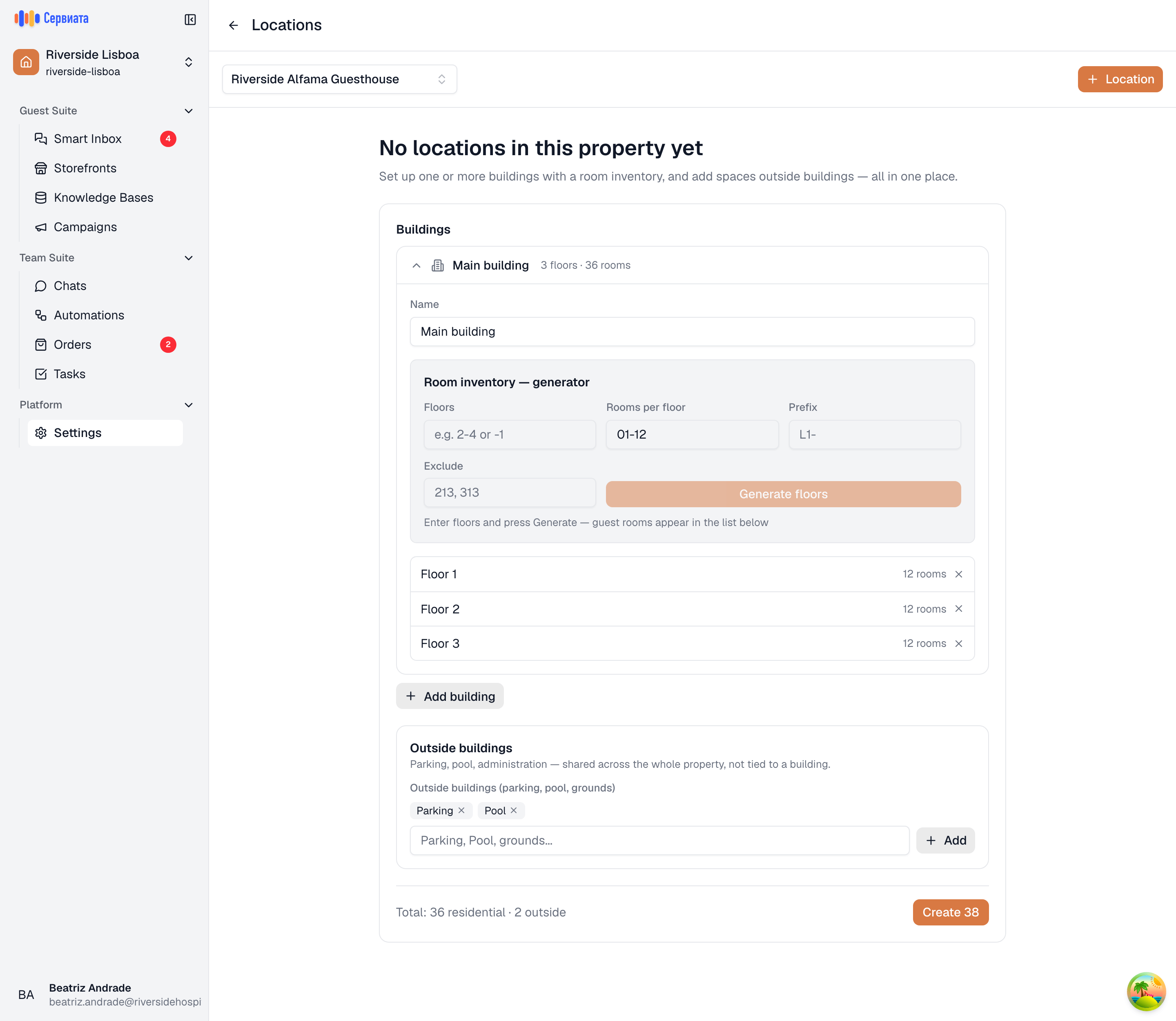
- 1
- 2
- 3
- Floors, rooms per floor, an optional prefix, numbers to skip and a room type
- Grounds that are not part of a building — parking, pool, garden
- What will be created, and the button that creates it
Name the building
The builder starts with one building open. Type its name — "Main building", "Annex", whatever your team calls it — and add more with Add building. Every building needs a name before anything can be created.
Generate the rooms
Under Room inventory — generator:
- Floors — which floors this building has.
1-6is floors one to six;-1is a basement, which comes out named "Basement 1";2-4, -1mixes the two. Ranges and single numbers, separated by commas. - Rooms per floor — the numbers to put on each of those floors, as a range or a list:
01-12, or01-10, 12, 14. Every generated floor gets the same set. - Prefix — put in front of every number, e.g.
L1-forL1-101. Leave it empty for plain numbers. - Exclude — numbers to skip, e.g.
213, 313for a hotel with no room 13. - Room type (optional) — a type for every room this run generates, e.g.
Suite. It is shown muted beside the number rather than added to it.
Press Generate floors. The floors appear in the list below, each with its room count. Anything that came out wrong can be removed with the × beside the floor and generated again.
If your numbering carries the floor — 101 to 120 on the first floor, 201 to 220 on the second —
generate one floor at a time: floors 1 with rooms 101-120, then floors 2 with rooms
201-220. Each run adds to the list, and a floor already in it is left as it is.
Add the grounds
Outside buildings are the parts of the property that belong to no building: parking, pool,
grounds. Type them as one comma-separated list — Parking, Pool, Garden — and press Add. Each
one becomes a container you can put spaces into later.
Create everything
The footer counts what you are about to make — Total: 120 residential · 3 outside — and Create 123 writes it. You land on the map with the structure already in place.
Up to 3000 locations can be created in one go. A generator run bigger than that says so and asks for a smaller range; nothing is created until it fits.
Nothing here is final: the builder is a fast start, not a commitment. Everything it creates can be renamed, removed and added to afterwards — see Adding and editing locations.