When a service can be booked
Opening hours, closed dates and how far ahead orders are taken — the schedule behind a service's date picker.
A guest picking a spa slot should not be offered Monday, when you're closed, or 07:00, when nobody's there. The Availability tab is what narrows that choice: the hours you actually work, the days you're closed, and how much warning your team needs.
Open a service in the editor, go to Availability, and turn on Limit when this can be booked. Everything below appears with sensible starting values — every day of the week open from 09:00 to 18:00 — which you then correct to reality.
This shapes the date picker, it doesn't close the shop
A schedule restricts what the guest can choose in the service's Date and Date & time questions. The service itself stays orderable around the clock, and the tab says so under the toggle. So a service that asks for neither a date nor a time has nothing to restrict, and a schedule on it changes nothing a guest can see — add the question first, on the Custom fields tab, then come back here.
All times are read in the storefront's time zone, which is named at the top of the tab as a reminder. That's a property of the storefront, not of one service — change it in the storefront's settings.
Weekly hours
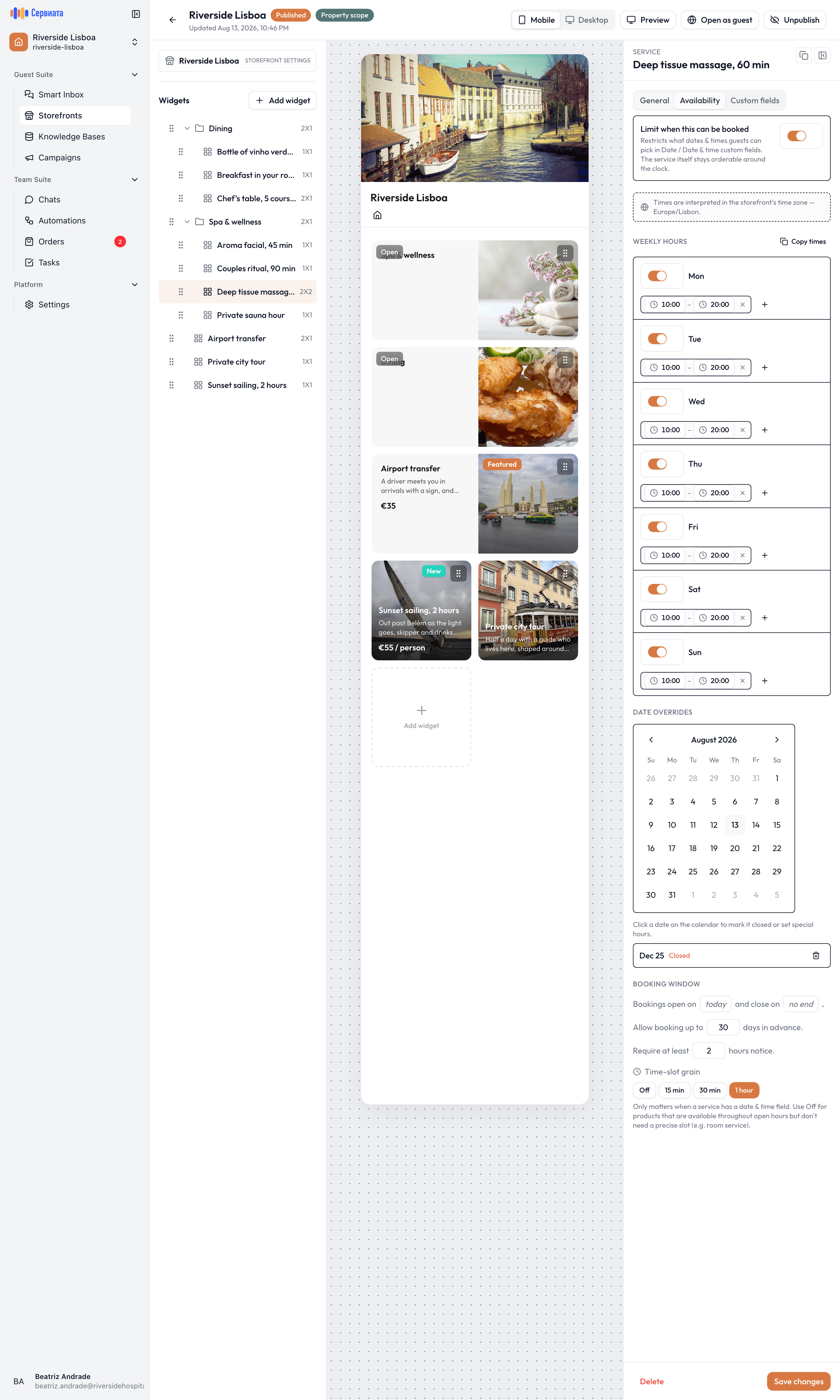
- 1
- 2
- 3
- A row per day, each with one or more time ranges
- The calendar of closed days and one-off hours
- How far ahead orders are taken, and how much notice you need
One row per day. The switch on the left opens or closes that day; a closed day reads Unavailable. An open day holds one or more time ranges — press + to add a second range for a service that stops for lunch, and the bin to remove one.
Setting seven days by hand is tedious, so Copy times offers three shortcuts:
- Apply Monday to weekdays — Monday's hours onto Tuesday through Friday.
- Apply Monday to all days — Monday's hours onto the whole week.
- Clear all days — start from nothing.
Set Monday the way you want it, then copy. It's the fastest route to a correct week.
Closed dates and one-off hours
The calendar under Date overrides handles the exceptions — a public holiday, a maintenance day, a Saturday you open late. Click a date and choose:
- Closed all day — nothing can be booked that day, whatever the weekly hours say.
- Custom hours — different ranges for that date only.
Press Done and the date joins the list under the calendar, marked so you can see at a glance which ones are closed and which have special hours. The bin removes an override and the date falls back to its normal weekly hours.
Overrides always win over weekly hours. You don't have to edit the week to close for one day.
How far ahead orders are taken
Booking window is four settings in two plain sentences, and they answer different questions:
| Setting | Question it answers |
|---|---|
| Bookings open on | Is this seasonal? Leave it at "today" for anything you always sell. |
| and close on | Does the season end? Leave it at "no end" if it doesn't. |
| Allow booking up to N days in advance | How far into the future may a guest book? |
| Require at least N hours notice | How much warning does your team need? |
The notice period is the one that saves your team from the impossible order. A massage that needs an hour to prepare a room, an airport transfer that needs a driver told the night before — put that number here and the guest is never offered a slot you can't honour.
Time slots
The Time-slot grain setting determines the options a Date & time question offers: 15 min, 30 min, 1 hour, or Off.
The grain chosen should match how the team actually schedules its work. For a treatment room booked on the hour, 1 hour is recommended; for a table, 15 or 30 min. Off suits services that need no appointment time at all: a bottle of wine sent to a room needs a date, not a slot.
Three example schedules
- Spa treatment. Opening hours 10:00–20:00 every day; grain 1 hour; minimum notice 2 hours; bookable up to 30 days ahead. Public holidays added as closed overrides.
- Airport transfer. Open around the clock, every day; grain 30 min; minimum notice between order and delivery 12 hours — a constraint set not by opening times but by the driver.
- Guided excursion, twice a week. Available on Tuesday and Thursday only, 09:00–10:00; grain Off, since the departure time is fixed; bookings closed after the season's last day.
Saving
Availability settings are part of the service card and are saved with it, using Save changes at the bottom of the Inspector. Turning the toggle back off removes every limit that was set, and the guest's date and time pickers go back to offering everything.