Activity
The feed of what happened around you — what lands in it, how to filter it, and what the number on the tab means.
Activity answers one question: what happened while you were doing something else. Work assigned to you, comments on tasks you're on, a status somebody changed, a mention — in one list, newest first.
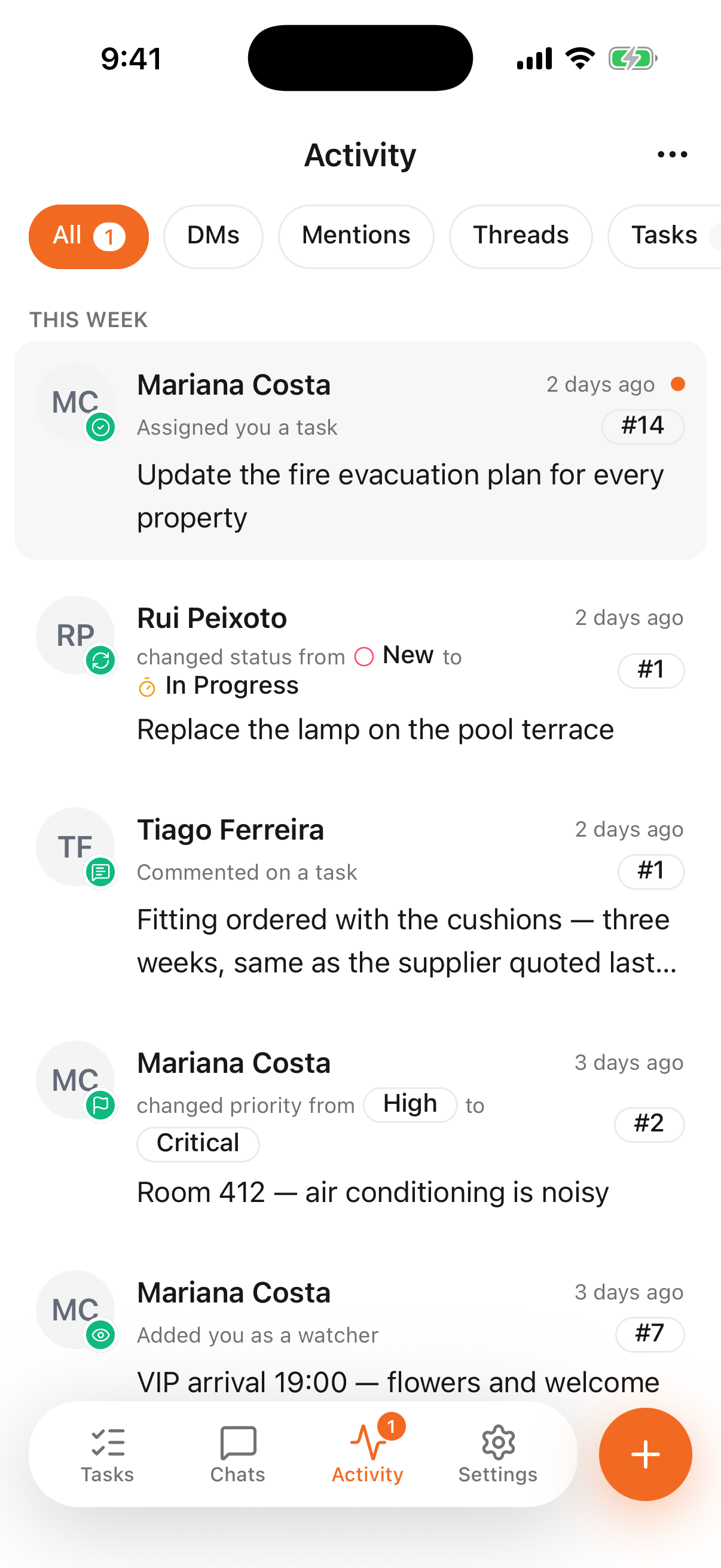
- 1
- Everything addressed to you, grouped by how recent it is
Reading an entry
Each line says who did it, what they did, and to which task — the # badge on the right is the task
number, and the text underneath is the task's title, or the comment if there was one. A dot at the
end of the line marks what you haven't opened yet.
Tap an entry to go straight to the task it's about.
Filtering
The chips across the top narrow the feed: DMs, Mentions, Threads, Tasks. The count next to All is how many entries you haven't looked at.
Entries are grouped by age — this week, then earlier — so a busy morning doesn't push yesterday's assignment out of sight.
The number on the tab
The badge on the Activity tab is the same count: things addressed to you that you haven't opened. It goes down as you read them, not on a timer, which is why it can sit there for days if nobody looks.
The feed is not the notification
A push notification arrives once, and it's easy to miss on a busy floor. The feed keeps the same event until you deal with it. If you turned push off in Settings, this list is still complete — it is the reliable half of the pair.
Which events reach you at all follows the same rules as on the web — see notifications.